Upload an Image
or Select from
Upload an Image
or Select from
(Optional)
Upload an Image
or Select from
(Optional)
Upload an Image
or Select from
(Optional)
Google's cutting-edge image generation model
Flux Kontext standard model with balanced performance
Powered by Google Nano Banana Official API
When this option is enabled, the output image may be selected by AI Generate and published to the Explore.
Eliminate backgrounds from any image in seconds using advanced AI background remover technology. Our intelligent system automatically detects subjects, preserves intricate edge details like hair and fur, and creates pristine transparent backgrounds without manual selection. Perfect for product photography, e-commerce listings, social media content, and professional portraits. Experience effortless photo background removal that delivers studio-quality results instantly—no Photoshop skills required.
An AI background remover is a sophisticated image editing tool that leverages artificial intelligence to automatically identify and separate foreground subjects from their backgrounds. Unlike traditional manual selection methods requiring precise tracing and hours of editing work, modern background eraser tools analyze image composition, recognize object boundaries, and intelligently distinguish between subjects and backgrounds in milliseconds. This technology employs deep learning algorithms trained on millions of images to understand complex edge characteristics, enabling accurate separation even around challenging areas like flowing hair, transparent fabric, and fine details.
Whether preparing product images for online stores, creating professional headshots with clean backgrounds, or designing marketing materials with isolated graphics, AI background removal streamlines workflows dramatically. The system preserves image quality while generating transparent backgrounds compatible with any design context, making it essential for e-commerce sellers, content creators, designers, and marketers who need to remove image backgrounds quickly and professionally without specialized design expertise or expensive software subscriptions.



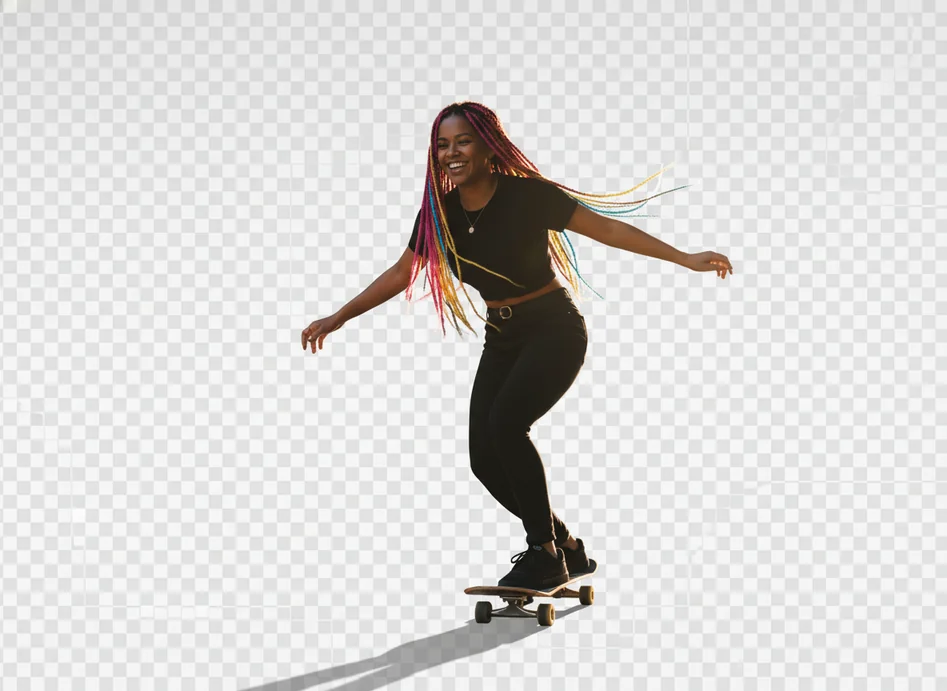
Experience pixel-perfect background removal powered by advanced machine learning algorithms.
Discover comprehensive AI background removal capabilities designed to handle every type of image with professional background eraser precision.
Upload any image and watch as advanced AI background remover technology instantly identifies your subject and eliminates the background in 3 seconds or less. Our intelligent system recognizes people, products, animals, and objects automatically, requiring zero manual selection or editing experience. Simply upload, process, and download your transparent background image—effortlessly simple.
Advanced algorithms preserve intricate details that challenge traditional background removal methods. Our AI accurately detects and maintains fine hair strands, fur texture, transparent materials, delicate jewelry, and complex edges without artifacts or halo effects. Experience professional-quality cutouts that retain every subtle detail of your subject's outline.
Intelligent recognition handles images containing multiple subjects, group photos, or complex compositions. The AI background eraser differentiates between foreground objects and backgrounds regardless of scene complexity, maintaining separation accuracy even when subjects overlap or appear at varying depths. Perfect for product bundles and multi-person portraits.
Process multiple images simultaneously with bulk background removal capabilities. Upload 5-100 photos at once and let AI handle batch operations automatically, maintaining consistent quality across your entire product catalog or photo collection. Dramatically accelerate workflows for e-commerce stores preparing hundreds of product images with clean backgrounds.
Beyond creating transparent backgrounds, replace removed backgrounds with solid colors (white, black, custom), upload personalized background images, or generate AI-powered scenes that complement your subject. Transform product photos across multiple background contexts instantly, creating diverse visual presentations from a single background removal operation.
While AI handles 95% of work automatically, optional brush and eraser tools provide pixel-level control for fine-tuning results. Restore accidentally removed areas, manually refine challenging edges, or adjust complex selections with precision editing capabilities. Combine automated efficiency with human oversight for perfect object cutout results every time.
Maintain image quality with support for high-resolution exports up to 4K-8K (4096x4096 pixels). Professional photo background removal preserves sharpness, detail, and color accuracy, producing output suitable for large-format printing, commercial use, and professional publications without quality degradation or pixelation issues.
Accept JPEG, PNG, BMP, HEIC, and HEIF uploads; export results as PNG with transparency or JPG with solid backgrounds. Universal format compatibility ensures seamless integration with design software, e-commerce platforms, and content management systems. Download transparent background files ready for immediate use across any project or platform.
Embed automated background removal directly into applications, production pipelines, and custom workflows through RESTful APIs. Scale operations programmatically, integrate with e-commerce platforms, or build custom solutions powered by professional-grade AI technology. Perfect for businesses requiring automated, high-volume image background eraser functionality.
From online stores to creative projects, AI background remover tools serve diverse needs across industries and creative disciplines.
Create professional product images with pristine white or transparent backgrounds required by Amazon, eBay, Shopify, and marketplace standards. Use AI background removal to isolate products from cluttered shooting environments, ensuring consistent, professional presentations that increase customer confidence and drive conversions across online sales channels.
Transform casual photos into polished professional portraits by removing distracting backgrounds. Perfect for LinkedIn profiles, corporate directories, speaker bios, and professional websites. Background eraser tools eliminate messy home offices, busy coffee shops, or unprofessional environments, replacing them with clean, executive-appropriate backgrounds instantly.
Design eye-catching social media graphics, Instagram posts, and promotional materials by isolating subjects for creative compositions. Remove image backgrounds to layer subjects onto branded templates, create collages, or design custom graphics that stand out in crowded social feeds. Accelerate content production for consistent brand presence across platforms.
Prepare assets for brochures, flyers, presentations, and digital advertisements by creating clean transparent background cutouts. Designers leverage photo background removal to integrate subjects seamlessly into layouts, ensuring graphics work across various contexts without distracting backgrounds competing for viewer attention.
Isolate elements for composite images, collages, and creative designs. Professional designers use object cutout tools to extract subjects for manipulation, combination, and integration into complex compositions. Whether building posters, banners, or digital art, background removal provides foundational elements for sophisticated visual projects.
Enhance property listings by removing vehicles, people, or distracting elements from architectural photography. AI background removal isolates building exteriors for presentation materials, removes unwanted objects from interior shots, or creates clean property images that focus buyer attention on spaces rather than temporary clutter or staging imperfections.
Discover how AI background remover technology has transformed workflows for businesses, creators, and professionals worldwide.
"As a small business owner managing product photos myself, this tool saved me countless hours. I processed 200 product images for my online store in one afternoon—work that would've taken weeks in Photoshop. The edge detection around jewelry is incredibly precise."
"The AI handles complex hair edges better than my manual Photoshop attempts. I create professional headshots for corporate clients, and this background remover delivers consistently clean results that meet strict quality standards. Absolute game-changer for portrait photographers."
"We needed white-background product photos for Amazon listings. Uploading 50 images and getting perfect results in minutes was mind-blowing. No more outsourcing editing work—we handle everything in-house now and save thousands monthly on editing costs."
"Creating Instagram content used to require hiring designers. Now I remove backgrounds from product shots, layer them onto branded templates, and design professional graphics myself. My engagement increased 40% since upgrading visual quality with this tool."
"The batch processing feature is phenomenal for agency work. We handle product photography for multiple clients—removing backgrounds from hundreds of images weekly. This AI maintains consistent quality across batches, ensuring uniform presentation for entire catalogs effortlessly."
"I'm not tech-savvy, but this tool is incredibly intuitive. Uploaded my DIY craft photos, clicked once, and got professional results instantly. Now my Etsy shop looks as polished as big brands—customers comment on how professional everything appears."
An AI background remover uses machine learning algorithms trained on millions of images to automatically identify foreground subjects and separate them from backgrounds. The AI analyzes your image, detects object boundaries, understands edge characteristics, and removes the background in seconds—all without manual selection. Advanced edge detection preserves fine details like hair strands while creating clean, professional transparent backgrounds.
Yes. Background removal automatically creates transparency, and images download as PNG files supporting transparent backgrounds. You can use these transparent cutouts anywhere—overlay them on designs, integrate into layouts, or replace with custom backgrounds. Alternatively, export with solid white, black, or custom color backgrounds if transparency isn't needed for your specific project.
Absolutely. Modern AI background eraser tools require no design software, technical skills, or Photoshop expertise. Simply upload your image to a browser-based tool, let AI process automatically, and download your result—completely eliminating hours of manual selection work. These tools democratize professional photo background removal for users at every skill level.
Advanced AI background removers excel at preserving intricate details including fine hair strands, animal fur, and transparent materials. Deep learning algorithms specifically trained on edge detection recognize and maintain these challenging details without artifacts or halos. While extremely complex cases may benefit from minor manual refinement, modern AI handles 95%+ of edge work automatically with professional quality.
Yes. Batch processing allows background removal from 5-100+ images simultaneously depending on your plan. Upload an entire product catalog, let AI process automatically, and download consistent results across all images. This feature dramatically accelerates workflows for e-commerce sellers, photographers, and agencies handling high-volume image background eraser operations.
Most AI background removal tools accept JPEG, PNG, BMP, HEIC, and HEIF uploads. Export results as PNG files with transparent backgrounds or JPG files with solid color backgrounds. This universal compatibility ensures seamless integration with design software, e-commerce platforms, content management systems, and any application requiring background-removed images.
AI background removal completes in 3 seconds or less for single images. Batch processing handles hundreds of images in minutes rather than the hours or days manual methods require. This dramatic speed advantage enables real-time workflows, instant content creation, and on-demand photo background removal without production bottlenecks or editing delays.
Many platforms offer free tiers providing core background removal functionality with resolution limits (typically 500x500 or 1024x1024 pixels). Free options suit casual users, small projects, or testing before committing to premium plans. Premium subscriptions unlock higher resolutions (4K-8K), batch processing, API access, and advanced features for professional or commercial use.
Generally yes—most services allow commercial use of processed images. You retain rights to your content; AI background remover tools simply provide technical processing. However, review specific terms of service for your chosen platform, especially regarding resale of editing services or redistribution of processed assets to third parties.
Free tiers often limit exports to 500x500 or 1024x1024 pixels, while premium plans support high-resolution outputs up to 4K-8K (4096x4096 pixels). Professional photo background removal maintains original image quality, preserving sharpness, color accuracy, and detail. High-resolution exports suit commercial printing, large displays, and professional publications.
Reputable services implement enterprise-grade security including encrypted uploads, secure processing, and automatic deletion within 24 hours after completion. Automated AI processing eliminates human access to your images, ensuring maximum privacy for product photos, personal portraits, and sensitive visual content during background eraser operations.
Yes. Beyond creating transparent backgrounds, many tools offer replacement options: solid colors (white, black, custom), uploaded custom background images, or AI-generated scenes. This functionality enables creating multiple product presentations from single photos, testing subjects across various contexts, and designing diverse visual treatments without reshooting or complex compositing work.
Experience professional AI background removal that eliminates tedious editing work. Create pristine transparent backgrounds, isolate subjects perfectly, and accelerate your workflow with intelligent photo background removal technology. Start transforming images instantly—free, fast, and effortlessly simple.