Portrait
The person smiles softly and blinks once, hair moves slightly in a light breeze. The camera stays still. Keep the face, hair and clothes the same. Upload a photo, describe the motion, and image to video AI animates it with Seedance 2.5, MiniMax H3 or another top model into a clip you can download.
Google's latest model with exceptional quality output
Fast and efficient model with flexible aspect ratio controls
When this option is enabled, the output video may be selected by AI Generate and published to the Explore.
Each clip started as one photo and one motion line, and image to video AI animated it with the model and length shown under the clip. All four were generated for this page on 2026-10-26 with Seedance 2.0 Fast at 720p.
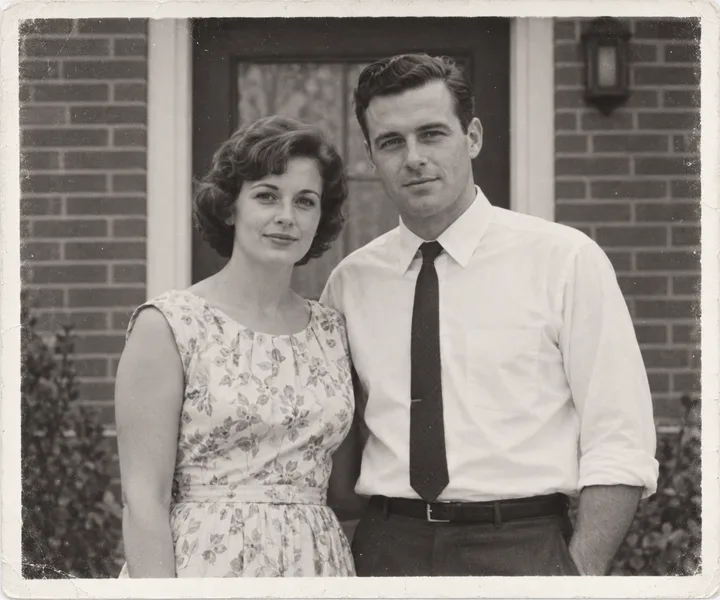
The couple slowly smile and blink once, the woman tilts her head slightly toward the man, a light breeze moves her hair. The camera stays still. Keep the black and white film look, both faces and clothes the same. 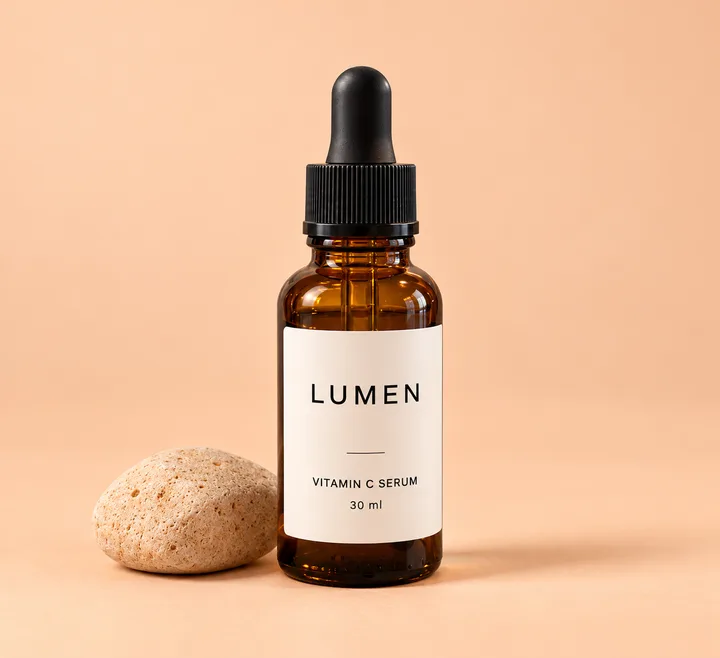
The camera slowly orbits about thirty degrees to the right around the amber serum bottle while a soft highlight glides across the glass. The bottle stays upright and the label LUMEN VITAMIN C SERUM 30 ml stays sharp and readable. Slow smooth camera push-in along the wooden pier toward the lake, morning mist drifts across the water, gentle ripples move the orange reflections, the low clouds slide slowly past the peaks. Steady camera, no people. 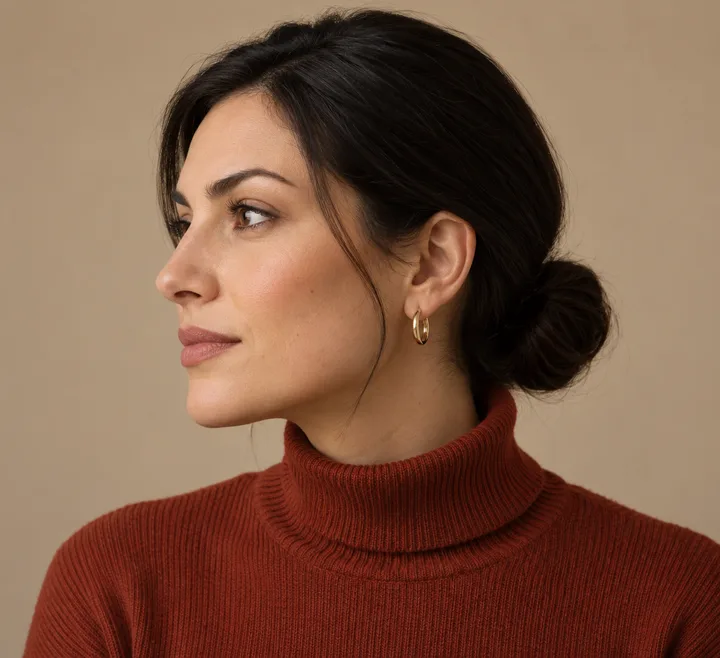
She slowly turns her head toward the camera and smiles, shoulders stay still, the camera stays still. Keep the same face, black low bun, gold hoop earrings, rust turtleneck and beige background. Upload the start frame, add an end frame only if the ending matters, write the motion in one line, then pick the model, length and ratio and generate.
A JPG or PNG up to 10 MB. The clip begins on this photo, so crop it the way the video should look.
Add a second photo when the last pose or framing has to land exactly, such as profile to facing the camera.
Say what moves, how much and how fast, and what the camera does. Do not describe what the photo already shows.
Seedance 2.5 is selected. Choose portrait or landscape, the resolution and the length; the credits show before you generate.
Want to change the photo first? Edit it with image to image AI, then click Turn into video to bring the result here as the start frame.
Start with Seedance 2.5 for longer or multi-reference clips and MiniMax H3 for the cleanest short shot; both sat at the top of public image to video leaderboards in October 2026.
| Model | Best for | Length and output |
|---|---|---|
| Seedance 2.5Default | Longer scenes, start and end frames, image, video and audio references | 4 to 30 seconds, 480p to 1080p |
| MiniMax H3 | The cleanest short single shot | 4 to 15 seconds, 768P or 2K |
| Veo 3.1 | Short cinematic clips with a start and end image | Up to 8 seconds, 16:9 or 9:16 |
| Wan 3.0 Video and Prime | Long clips guided by references | 2 to 30 seconds, up to 1080P |
| Seedance 2 Mini | Quick drafts | 4 to 15 seconds, 480p or 720p |
| Grok Imagine Video 1.5 Preview | Very short loops | 1 to 15 seconds, 480p or 720p |
Describe what moves, how much and how fast, keep the camera fixed or give it one move, and say what must stay the same.
Subject action + environment motion + camera + what stays the same
The person smiles softly and blinks once, hair moves slightly in a light breeze. The camera stays still. Keep the face, hair and clothes the same. The camera slowly orbits thirty degrees around the product while a soft highlight moves across it. The product stays still and the label stays sharp. Slow push-in toward the horizon. Clouds drift, water ripples gently, trees sway a little. Natural colors, steady camera. The dog tilts its head and wags its tail twice, ears twitch. The camera stays at its eye level and does not move. Keep its fur color and collar the same. Use only a start frame when the ending is open, and add an end frame when the last pose, framing or state has to land exactly.
The fourth example above used this setup: a profile photo as the start frame and a facing-camera photo of the same woman as the end frame. In the workbench, the second photo you upload becomes the end frame on models that support it.
Add an end frame →Faces and hands drift when the motion is large or the camera turns, so keep the action small, the camera still and the clip short, and add an end frame of the same person.
The model has to keep the same face and hand shapes across every frame while the angle changes. A sharp first frame helps, but it does not guarantee later frames, and the drift grows with bigger motions, camera turns and longer clips.
Pick Portrait for TikTok, a plain-background product shot for a spin, and a sharp scan for old photos, then use the matching motion line below.
Portrait 9:16, 720p or 1080p, 5 to 10 seconds. Keep the subject centered with space above the head so captions do not cover the face.
The person looks up at the camera, smiles and gives a small wave. The camera stays still. Start from a product on a plain background, 9:16 or 1:1, about 5 seconds. Ask for a slow orbit or push-in and name the label text that must stay readable.
Slow thirty degree orbit around the bottle, soft highlight moves across the glass, label stays sharp. Scan the print sharp and crop to the people, keep the clip to about 5 seconds and the camera still.
The people smile slightly and blink once. The camera stays still. Keep the black and white film look. Free routes give 5 to 10 second clips with an account, ads or lower resolution; AI Generator runs Seedance 2.5, MiniMax H3 and Veo 3.1 and shows the credits before each run.
Adobe Firefly gives about 5 second clips with a free account and daily limits, and some ad-supported sites give short clips at lower resolution. On AI Generator each run uses credits, shown before you generate, with Seedance 2.5, MiniMax H3 and Veo 3.1.
Up to 30 seconds with Seedance 2.5 or Wan 3.0, up to 15 seconds with MiniMax H3 and Seedance 2 Mini, and up to 8 seconds with Veo 3.1.
Some models generate audio from the prompt, so describe the sound you want or write "no music". Seedance 2.5 and MiniMax H3 also accept an audio reference. Clips without sound can be scored when you post them.
A sharp, well lit photo with the subject large in the frame, hands visible and not cut off, and a simple background. Avoid group shots when the motion is about one face.
No. Image to video starts from your photo and keeps its look; text to video invents the look from words.
Large motions and camera turns make identity drift. Keep the action small, the camera fixed and the clip short, or add an end frame of the same person.
More ways to animate a photo
Upload a photo and describe the motion.
Animate your photo now