Chin Bob + Curtain Bangs

Before

After
Input: one front selfie · Chip: Chin Bob + Curtain Bangs · GPT Image 2.5 Flare, image to image · still only · made 2026-11-04
Upload one photo with your face to the camera, tap a cut or colour chip or type your own, and compare the new hair with your original on a drag slider.
This session
My creations Your results appear here. Every result is also saved in My creations; if a run fails, the credits go back to your balance.
Each pair shows the same original adult before and after one change: long hair to a chin bob, the bob in copper, waves to a low fade crop, and a buzz cut.
Input: one front selfie · Chip: Chin Bob + Curtain Bangs · GPT Image 2.5 Flare, image to image · still only · made 2026-11-04
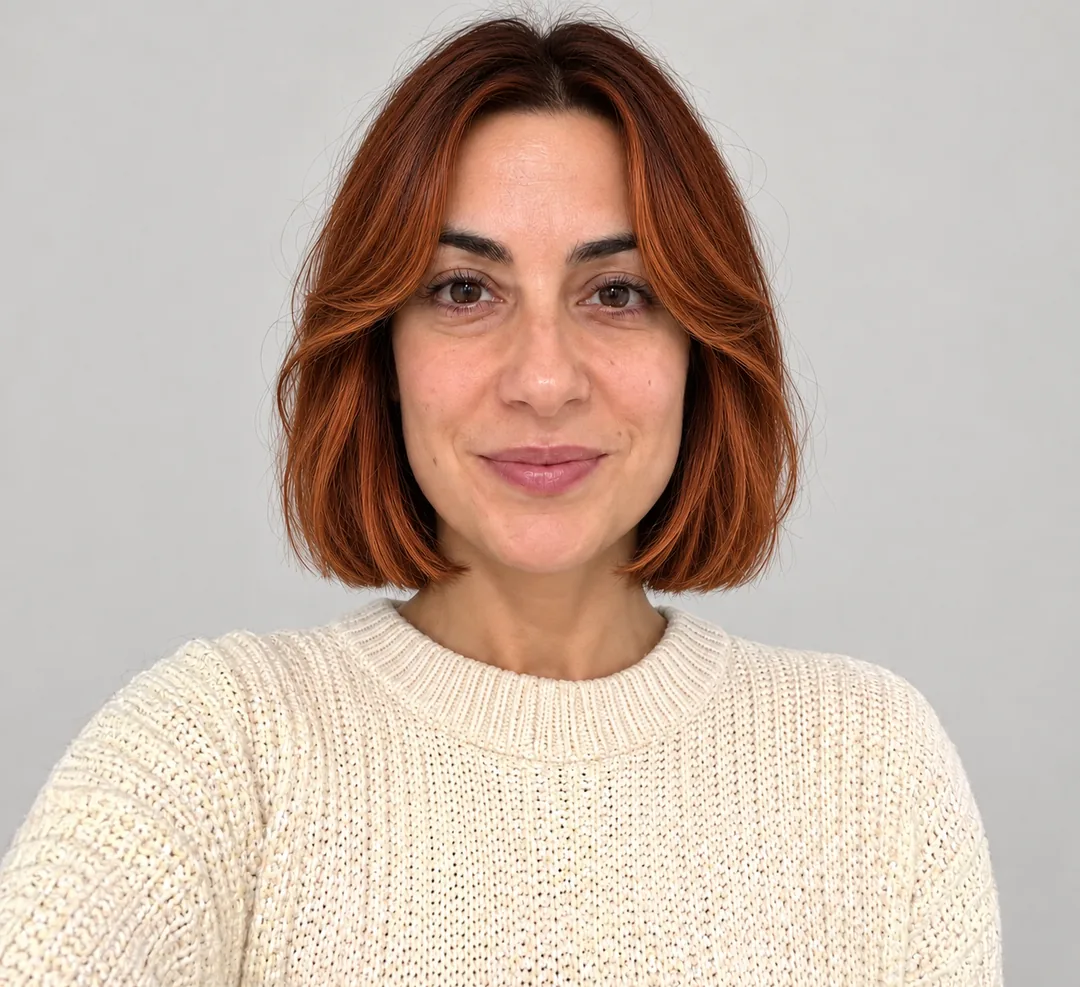
Input: the bob result · + Copper colour, cut kept · GPT Image 2.5 Flare, image to image · still only · made 2026-11-04


Input: one front selfie · Chip: Low Fade Crop · GPT Image 2.5 Flare, image to image · still only · made 2026-11-04

Input: the same selfie · Chip: Buzz Cut (#2) · GPT Image 2.5 Flare, image to image · still only · made 2026-11-04
The people are original adult characters generated for this page, not customers or celebrities. Each result was made on November 4, 2026 with GPT Image 2.5 Flare from the photo on the left, using the chip prompt on this page; the copper pair edits the bob result again, so the same person changes twice. Still only, no video. Last checked .
Upload a front-facing photo, tap a style chip or type the cut you want, press Change hairstyle, then drag the slider to compare.
Use one clear, recent photo with your face straight to the camera, even light and your hairline visible: no hat, no hand in your hair, no heavy filter.
Each chip fills an editable prompt that changes only the hair. Keep it, or rewrite the cut in your own words, such as "wolf cut" or "shag with curtain bangs".
Press Change hairstyle; the credit cost shows on the button first. Download the result and put it next to your original, the way the samples above work, then try another chip.
Six chips cover the cuts people ask about most: Chin Bob + Curtain Bangs, Long Layers and Pixie Cut for women, Low Fade Crop, Buzz Cut and Side Part for men.
Keep your cut and change only the colour or the fringe: pick a shade that suits your undertone, or add curtain, side-swept or blunt bangs to the same photo.
Look at your skin in daylight. Pink or bluish undertones are cool and suit ash blonde to medium ash brown; golden or peach undertones are warm and suit golden blonde, golden highlights or warm red-brown. The preview shows the overall look; a real copper or light blonde also depends on your current colour and whether it needs bleaching first.
Type "add curtain bangs", "add side-swept bangs" or "add blunt bangs, keep the length". Heart-shaped faces often suit blunt bangs, diamond faces curtain bangs at the cheekbones, oblong faces a soft fringe.
Going shorter previews well, because the model only removes hair. Going longer is a looser guess below the shoulders, so treat it as a mood, not a promise.
Start from your face shape and hair texture, run two or three candidate cuts on the same photo, and keep the one that still looks like you.
Live colour filters in beauty apps are free, generative editors give a few free tries, and this workbench shows its credit cost before you generate; your photo is used for your result and kept in your history.
For December parties, try a sleek low bun with a velvet bow or a slick side part, then dress the same photo on AI Clothes Changer.
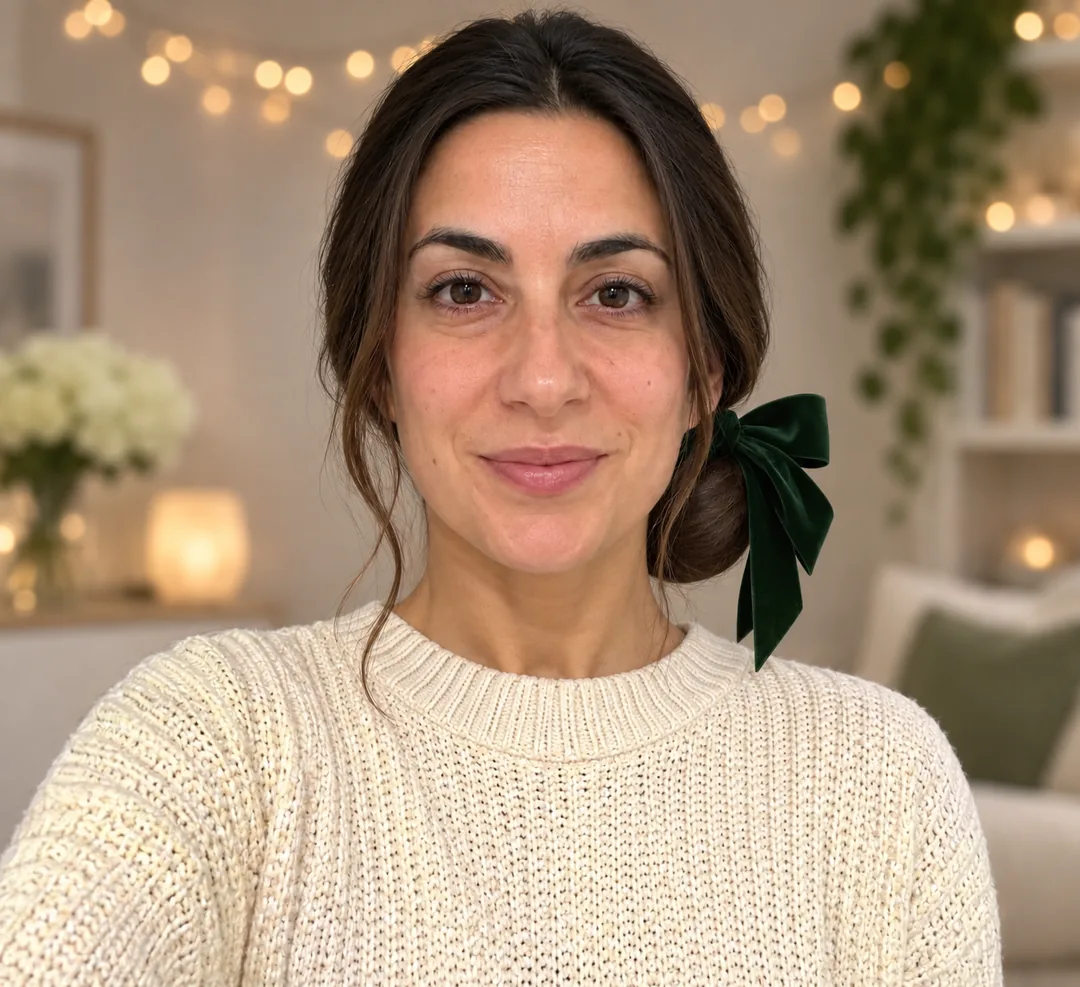
The chip puts long hair in a sleek low bun with a deep green velvet bow and swaps the background for warm string lights. Made from the same long-hair photo as the bob sample.
Pick the Side Part chip and add "slicked with a light shine" for a party version. It works on short and medium hair.
Download the new hairstyle and upload it on AI Clothes Changer to try a party outfit on the same photo, then animate it in Image to Video.
Change the outfit on AI Clothes Changer →Animate it in Image to Video →It keeps your face and redraws only the hair: cut, length, colour and fringe. The result is a new still that you compare with your original photo before you book a cut.
Yes. Press + Copper colour or type the shade you want and add "keep the cut". Cool, pinkish skin usually leans ash; warm, golden skin leans golden or copper.
The chip prompts tell the model to keep your face, skin and expression. If the face still drifts, upload a sharper photo taken straight to the camera in even light.
Yes. Low Fade Crop, Buzz Cut and Side Part are chips. Type "quiff", "French crop" or "#4 buzz cut" in the prompt box for other cuts.
Yes, and long-to-short previews read best, because the model does not have to invent hair below the shoulders. Short-to-long previews are a looser guess.
Yes. Download the result and open it in Image to Video for a short head-turn clip. This page itself only makes the still.
Keep the same photo and change the outfit, the makeup or anything else.